





Hello SmashLadder! ☕c(ˊᗜˋ♡c)
For awhile now, Faster Melee users have not been able to use the 'Netplay Safe Kill Music' code due to it's lack of inclusion in recent FM Dolphin builds. Because of this, users of these builds are forced to play with Melee's background music unless they turn it off from the in-game menu. Users of these builds now have the option to add the 'Netplay Safe Kill Music' code back into their FM builds.
Please keep in mind that this code has not been thoroughly tested and may desync/crash builds. Due to this, I would advise you not to use this code during ranked/serious matches of any kind.
Right click Melee's banner in Dolphin, click 'Properties', click on the 'Gecko Codes' tab, then click the 'Edit Config' button. Paste the following code into the configuration file:
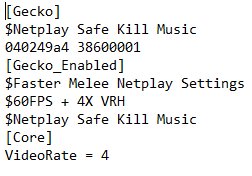
[Gecko]
$Netplay Safe Kill Music
040249a4 38600001
Your Gecko configuration file should now look something like this:
When booting the game, you will see a warning message that says 'Possible Desync on Frame 0.' Ignore this message, as it's only temporary. This is the same type of message you will see when booting a ISO with character skin mods/stage mods.
Enjoy your musicless Melee!